
Note Pad Lock1.0 - Get APK
You'll be able to download in few seconds.
Publisher Description
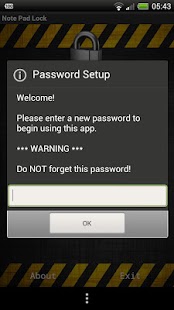
This handy little app is designed with privacy in mind, keeping your personal notes private.
It's a Notepad with a Padlock!!
This can be useful for carrying sensitive information such as PIN, account or telephone numbers, or for doing the holiday shopping and keeping your presents a surprise!
How many times a day do you wish you had a pen and piece of paper in your pocket to take a note? Have you ever lost an important note or forgotten an email password, phone number or PIN number? No more with Note Pad Lock!
Whether it be a account number, password, PIN or just a shopping list; you can be sure no-one else who uses your Android device will be able to access your private notes.
This app is simplicity itself. All you have to do is set up your password the first time you use the app and you are ready to go! You now have a password protected piece of paper in your pocket!
The app has 3 different backgrounds to choose from and is capable of both portrait and landscape screen orientations depending on how you hold your device. If you want to change the background, simply tap the picture of the padlock and the background will cycle through the 3 choices!
This app is FREE with NO ADVERTS - Please remember to donate if you like and use the app frequently.
Thank-you! :)
Warning - Logins CANNOT be reset without destroying the data stored in your database, so please make sure that you remember your password!
Any problems, please contact me via email.
Since some of you are having difficulty using the app, I made step by step instructions below :-
OPEN THE APP -> SET UP A PASSWORD OR LOGIN USING THE PASSWORD YOU SET -> ARRIVE AT NOTEPADLOCK SCREEN -> TICK THE "VIEW" BOX TO SEE YOUR NOTES -> TICK THE "EDIT" BOX TO ADD TO OR CHANGE YOUR NOTES -> CLICK "SAVE" TO SAVE YOUR NOTES -> CLICK "EXIT" TO EXIT THE APP.
If you have difficulty using or understanding the app, please email me to discuss before you rate or comment badly.
Permissions - The Internet permission is required for error reporting and Android Market / Google Play statistics. NO personal data EVER leaves your phone or tablet. The Internet permission is also required by default for all apps made with App Inventor. Hope that adequately explains the need for this permission in a privacy app, but if you are unsure, don't install, or email me for further explanation.
Graphics - Icon and Backgrounds used in this app are licensed for free commercial and non-commercial use under the Creative Commons Attribution 2.0 Generic.
*** This app has been thoroughly tested for use with Froyo, Gingerbread, Ice Cream Sandwich and Jelly Bean *** This app scans clean with Norton, AVG and Webroot ***
Test Devices : Desire HD, Sensation, One X + Nexus 7
About Note Pad Lock
The company that develops Note Pad Lock is Gareth Hannaway. The latest version released by its developer is 1.0.
To install Note Pad Lock on your Android device, just click the green Continue To App button above to start the installation process. The app is listed on our website since 2012-04-12 and was downloaded 0 times. We have already checked if the download link is safe, however for your own protection we recommend that you scan the downloaded app with your antivirus. Your antivirus may detect the Note Pad Lock as malware as malware if the download link to appinventor.ai_Gareth_Hannaway_420.NotePadLock is broken.
How to install Note Pad Lock on your Android device:
- Click on the Continue To App button on our website. This will redirect you to Google Play.
- Once the Note Pad Lock is shown in the Google Play listing of your Android device, you can start its download and installation. Tap on the Install button located below the search bar and to the right of the app icon.
- A pop-up window with the permissions required by Note Pad Lock will be shown. Click on Accept to continue the process.
- Note Pad Lock will be downloaded onto your device, displaying a progress. Once the download completes, the installation will start and you'll get a notification after the installation is finished.
Program Details
System requirements
Download information
Pricing
Version History
version 1.0
posted on 2012-04-12
version 1.0
posted on 2012-04-12
Several fixes and updates
Disclaimer
External Download
We do not host Note Pad Lock on our servers. We did not scan it for viruses, adware, spyware or other type of malware. This app is hosted by Galad and passed their terms and conditions to be listed there. We recommend caution when installing it.
The APK Download link for Note Pad Lock is provided to you by apps112.com without any warranties, representations or guarantees of any kind, so access it at your own risk.
If you have questions regarding this particular app contact the publisher directly. For questions about the functionalities of apps112.com contact us.
